Quote to cash
Quote to cash without Excel: one B2B deal, followed from lead to invoice
Most growing sales teams do not have a quote-to-cash process. They have a spreadsheet, an inbox and one person who remembers how it all fits together. This article follows one illustrative deal through that workaround, shows where it leaks, and then runs the same deal through Saleslox, screen by screen.
The scenario: a growing B2B team that sells with quotes
Illustrative scenario. Harbourline Supply, its people and its numbers are invented to show a common pattern. It is not a Saleslox customer, and no results are claimed for it.
Harbourline Supply is a distributor of industrial safety equipment. It has twelve people in sales: a sales manager, eight account executives, two sales development reps and a part-time sales operations analyst who also helps finance at month end. Its buyers are facility managers and procurement teams. Deals take weeks, not days, and nearly every one needs a formal quote with line items, a discount and an expiry date.
Harbourline has a CRM in name. In practice the work runs like this:
- Enquiries arrive in a shared inbox and get pasted into a “Leads” spreadsheet.
- Each account executive keeps a personal pipeline tab and updates it before the Monday meeting.
- Quotes are built in a Word template, saved as PDF and sent from personal email.
- When a customer says yes, someone re-keys the order into the accounting system, and finance raises the invoice from there.
- The forecast is a separate workbook the analyst rebuilds every Friday from the reps’ tabs.
Now follow one deal. A facilities manager at a hospital group asks for pricing on 40 gas-detection kits with installation. An SDR copies the email into the leads sheet and tags Dana, an account executive, in a cell comment. Dana builds the quote in Word, copies unit prices from last quarter’s price list and applies the 8% discount her manager agreed to in a hallway conversation. She sends it from her own inbox.
A week later the customer asks for 45 kits with staged delivery. Dana saves Quote_v2_final.pdf and replies on a different thread. Her manager is on leave, so the revised discount is approved in a chat message. On Friday, Dana’s tab says the deal is 70% likely; the forecast workbook still says 40%, because it was built from last week’s copy.
The customer accepts by email. The order is keyed into accounting from the PDF attached to the first thread, so it says 40 kits, not 45. The invoice goes out wrong. A credit note follows, then a re-issued invoice, then a slower payment and an awkward call.
Nobody in this story did anything careless. Every step was a reasonable person using a reasonable tool. The failure is structural.
The problem: one deal, five places, no record
By the time Harbourline’s deal closed, it existed in at least five places: the leads sheet, Dana’s pipeline tab, two PDFs in two email threads, the accounting system and the forecast workbook. Each hand-off was a copy, and every copy could drift from the others.
That is why the questions a sales manager actually needs answered are so hard to answer in a spreadsheet setup:
- Which version of the quote did the customer accept?
- Who approved the discount, and when?
- Which quotes have expired while the deal still shows as open?
- What is the real commit for this month, and does it match the board?
None of these is an exotic question. They are the basic facts of a sale. When they live in different files, someone has to reconcile them by hand, and reconciliation is where mistakes and delays come from.
What teams use today, and what it really costs
Excel and Google Sheets trackers
Spreadsheets are flexible, free and familiar, which is exactly why they become the pipeline. The catch is that spreadsheets carry errors even when people are careful. In a peer-reviewed audit of 50 operational spreadsheets from real organisations, researchers at Dartmouth found that 43 of the 50 contained at least one error that produced a wrong result, and estimated that around 1% of all formula cells were in error [1]. A pipeline sheet that is copied, re-pasted and re-sorted every week gives those errors more chances to spread.
Email threads as the quote archive
When the quote and the customer’s acceptance sit in one person’s mailbox, there is no status, no version history the team can see and no warning when a quote expires. If that person is on leave, the deal is effectively invisible.
Copy-paste quotes from Word templates
Typing prices by hand invites old prices, unapproved discounts and slightly different letterheads for every salesperson. It is also slow. Salesforce’s State of Sales report, based on a survey of 4,050 sales professionals in 22 countries, found that reps spend 40% of an average workweek selling and 60% on other work. In the report’s breakdown of that week, creating quotes takes 17% and manually entering data takes 13% [2].
Separate order entry and invoicing
Every time an accepted quote is retyped as an order, and the order retyped as an invoice, quantities and prices can drift. Harbourline’s 40-versus-45 mistake is the classic version. Finance then starts its own spreadsheet to track what sales promised.
Manual forecasts
A forecast rebuilt by hand on Friday is already out of date on Monday. The same Salesforce report found that 57% of sales professionals say customers take longer to decide than they used to [2]. Longer cycles mean more weeks in which a copied number can quietly go stale. Among teams using AI agents, the report also lists manual errors as the top data issue [2], a reminder that automation is only as good as the record underneath it.
None of these costs shows up as a line item. They show up as a wrong invoice, a missed follow-up, a discount nobody can explain or a forecast that jumps in the last week of the quarter.
How Saleslox runs the same deal
The fix is not a better spreadsheet. It is one record per deal that every step writes to. Here is Harbourline’s deal again, this time in Saleslox. The screenshots are real Saleslox screens from a demo workspace on the Enterprise plan; where a feature depends on the plan, we say so.
Step 1: the enquiry becomes a lead, not a row
The enquiry goes onto the Leads board, which has New, Working, Qualified, Converted and Disqualified columns. Each lead is tagged hot, warm or cold, and the team can search by company, contact name, email, phone, source, notes or salesperson. Ownership is visible on the record, not in a cell comment.

Step 2: convert the lead, and the opportunity exists
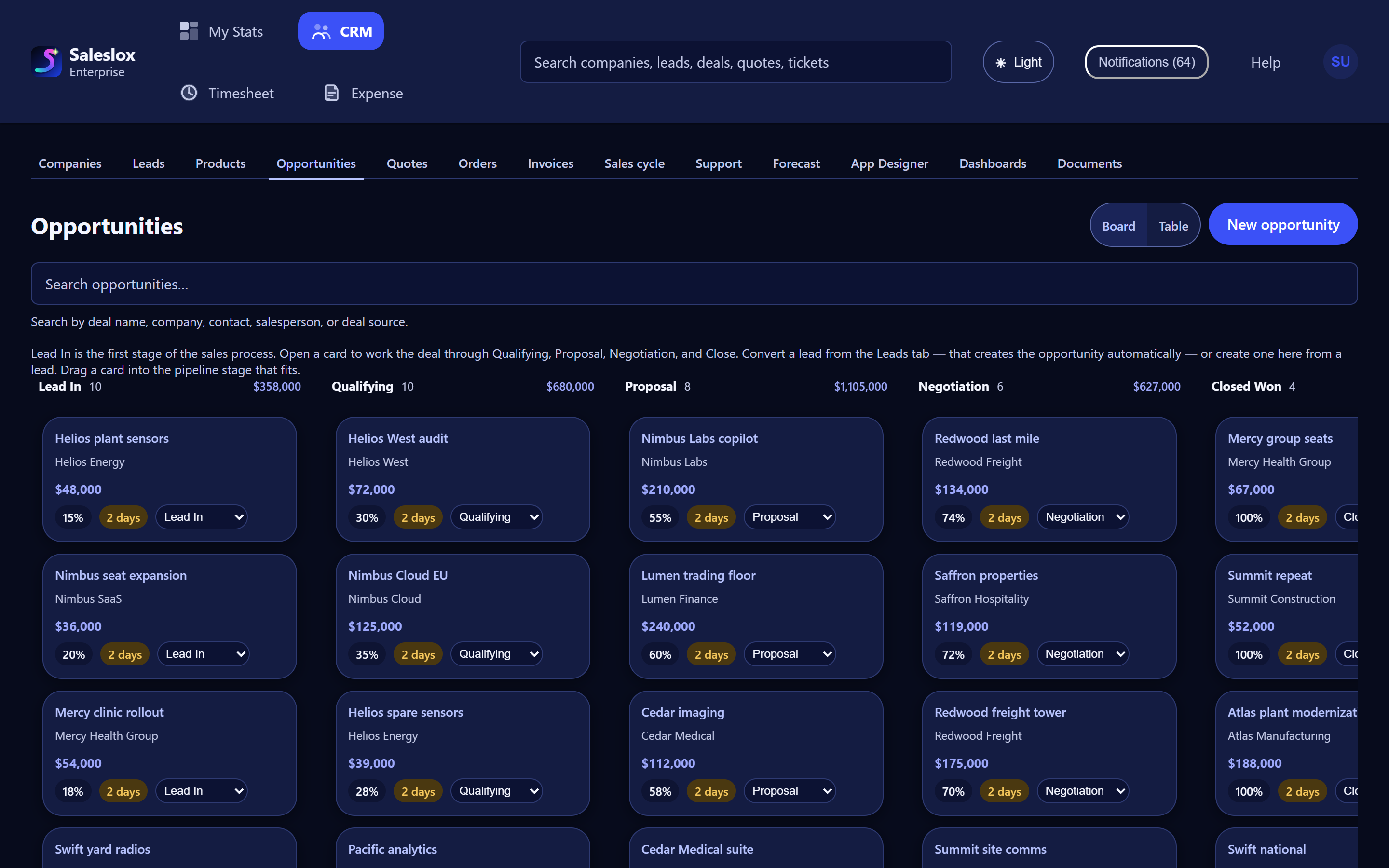
Converting a lead from the Leads tab creates the opportunity automatically. The opportunity board shows the stages Lead In, Qualifying, Proposal, Negotiation and Closed Won, with the total value in each stage. Every card shows the deal value, its probability and an age badge, and moving the deal forward means dragging the card to the next stage. The same data is available as a table. On Professional and Enterprise, opportunity aging and stalled-deal alerts flag deals that have gone quiet.
Step 3: the company record and sales cycle hold the context
The hospital group gets one company record with its billing address, status, industry and territory, plus tabs for contacts, activities and leads and a snapshot of open pipeline. From that page the team can raise a new lead, open a support ticket or start a sales cycle. A sales cycle is a timed, seven-stage flow, from lead identification to follow up, with dates on every stage. Stage tabs stay green while on track, turn amber when something is due soon and red when it is overdue. Sales-cycle workflows are on Professional and Enterprise.

Step 4: the quote is built on the deal
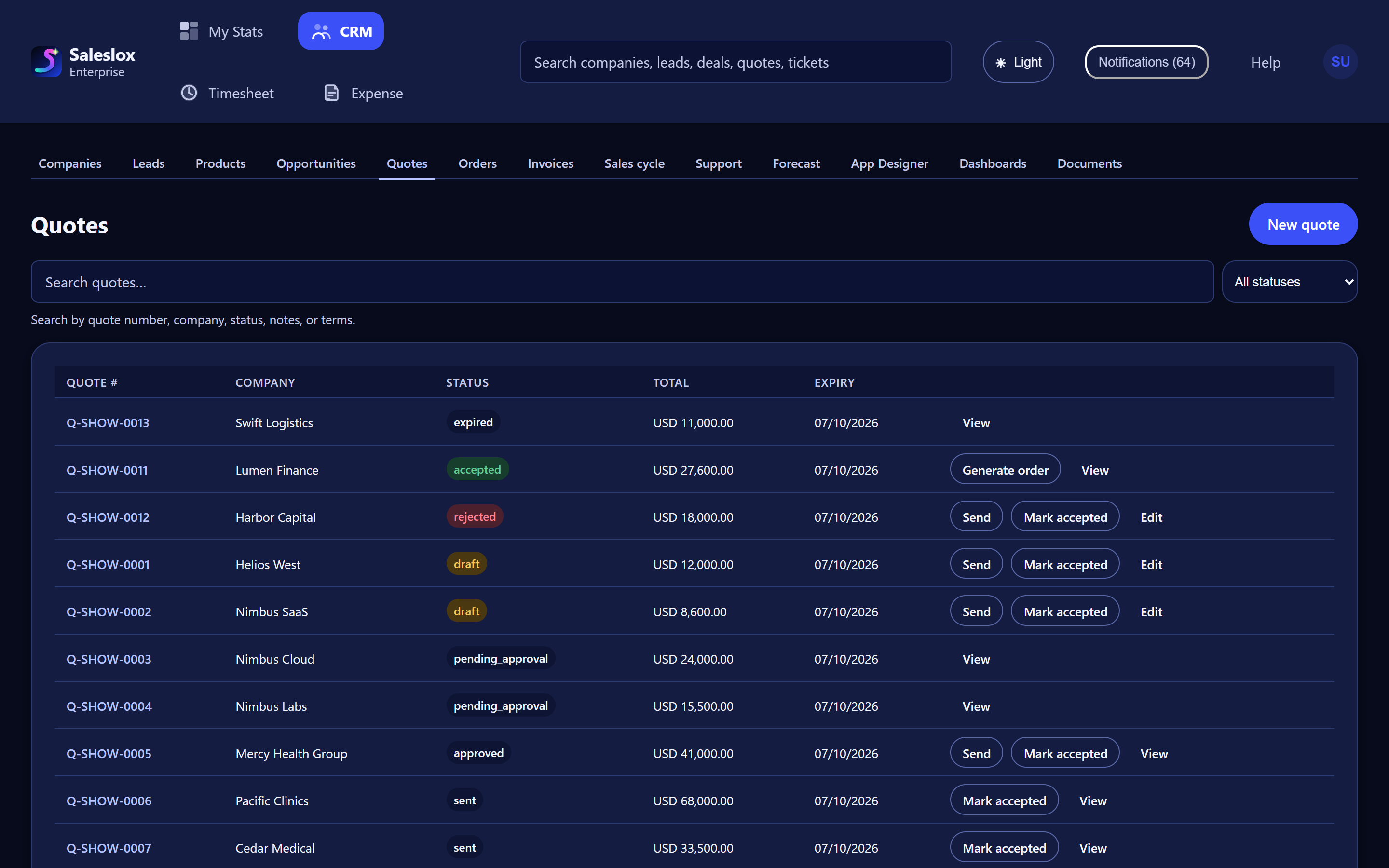
Dana builds the quote in Saleslox, with line items from the product catalogue rather than last quarter’s PDF. The Quotes list shows every quote’s number, company, status, total and expiry, and the statuses tell the whole story: draft, pending approval, approved, sent, accepted, rejected or expired. Send, Mark accepted and Edit sit on the row, so the change to 45 kits is an edit to the same quote, not a new attachment called v2_final.
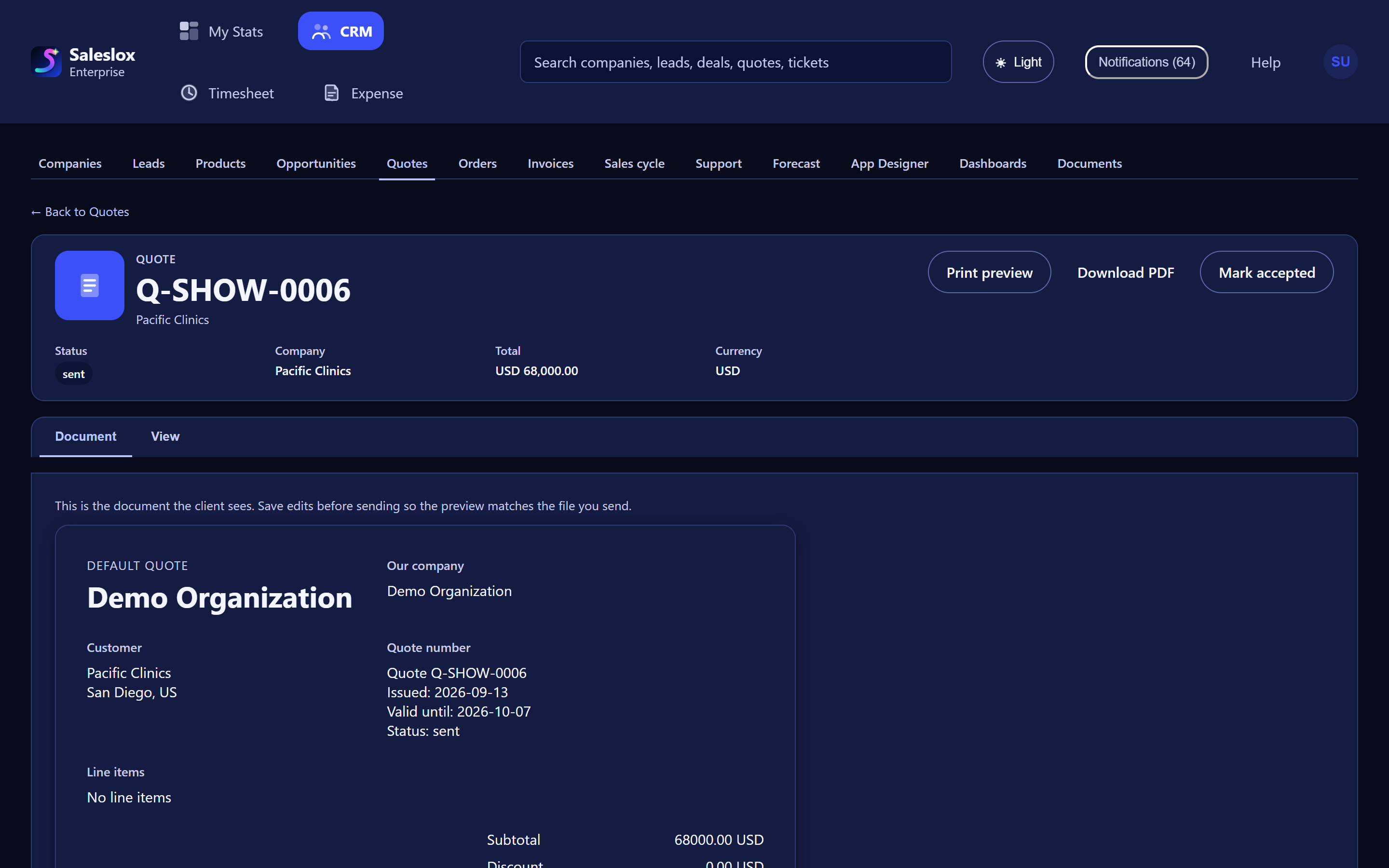
Each quote has a Document view that shows exactly what the client sees, with Print preview and Download PDF. The customer still gets a professional PDF; the difference is that the PDF comes from the saved record, so the team always knows which version went out. Quote and order templates on Professional and Enterprise keep logo and terms consistent across the team.
Step 5: accepted means generate order, then invoice
When the customer accepts, the quote is marked accepted and a Generate order action appears. The order comes from the accepted quote, with the same lines and quantities, so the 40-versus-45 mistake has nowhere to happen. On Enterprise, invoices continue on the same path, so finance works from what sales actually agreed rather than from a forwarded email.
Step 6: the forecast is the board
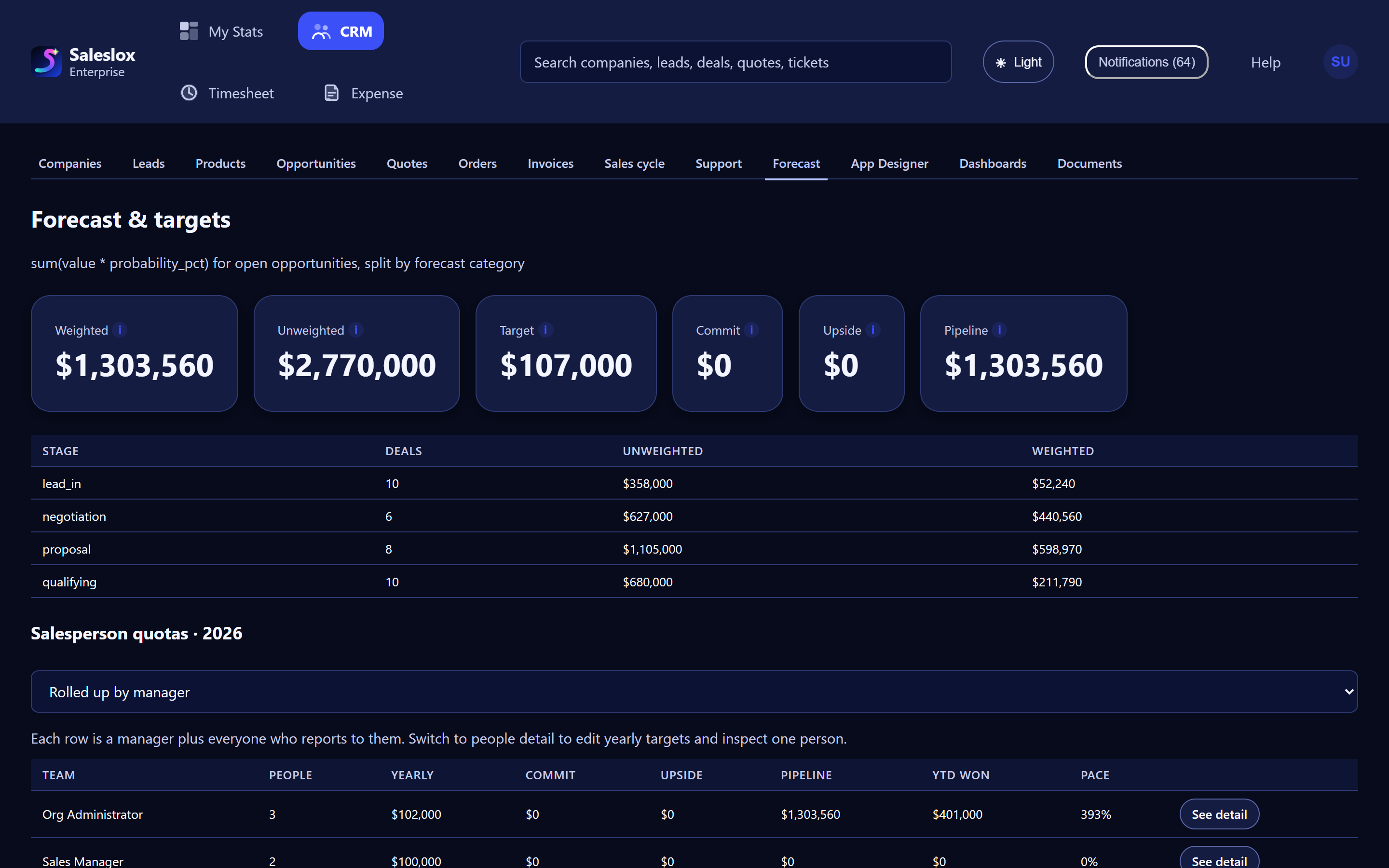
On the Forecast & targets screen, the weighted forecast is calculated as value times probability for open opportunities, split by forecast category. It shows weighted, unweighted, target, commit, upside and pipeline figures, a breakdown by stage, and salesperson quotas rolled up by manager with year-to-date won and pace. When Dana moves her card from Proposal to Negotiation, the forecast moves with it. Nobody has to rebuild anything on Friday.
Step 7: one dashboard for the Monday meeting
The Sales overview dashboard shows pipeline value, opportunities, leads, quotes, orders, amount invoiced and average lead score at a glance, with a deal-flow funnel by stage. Professional and Enterprise include a custom dashboard designer. On Enterprise, the App Designer lets an administrator choose which fields appear on records, so the CRM can match how the team actually sells.

Spreadsheet workaround vs Saleslox
| Step | Spreadsheet workaround | Saleslox |
|---|---|---|
| Lead capture | Pasted from a shared inbox into a sheet; owner in a comment | Leads board with status columns, hot/warm/cold tags and search |
| Deal stage | Personal tabs updated before meetings | Opportunity board with stage totals, probability and age on each card |
| Quote creation | Word template, prices typed by hand | Quote on the record with catalogue line items and templates |
| Versions and approval | Files named v2_final; approval in chat | One quote with a visible status, from draft and pending approval to accepted |
| Expiry | Nobody notices | Expiry date and expired status on the Quotes list |
| Order and invoice | Re-keyed into accounting | Generate order from the accepted quote; invoices on Enterprise |
| Forecast | Rebuilt by hand every Friday | Calculated live from open opportunities, with quotas by manager |
| “Which quote was accepted?” | Search someone’s inbox | Open the quote and read its status |
What changes for a team like Harbourline
In the illustrative scenario, nothing about Harbourline’s people changes. Dana still talks to the customer, the manager still approves discounts and finance still invoices. What changes is that each of them works on the same record. The question “which version did they accept?” becomes a status, not an investigation. The Monday meeting starts from the board, not from a workbook built on Friday. And the order matches the quote because it was generated from it.
How to test this on your own deals
- Pick one live deal that already has a quote out.
- Create the company and the opportunity, and put the card in its real stage.
- Rebuild the quote on the record from your catalogue, then send it, or mark it sent if it has already gone.
- When the customer accepts, mark it accepted and generate the order.
- Open Forecast & targets and check that the number matches what you would have said in the meeting.
If that path is shorter than hunting through inboxes and tabs, you have your answer. The trial is 30 days of Professional, with no card. Invoices are on Enterprise. For a guided first week, see your first week in Saleslox, or read how to send the quote from the deal.
Frequently asked questions
What does quote to cash mean?
Quote to cash is the path a deal takes from the first price you send to the money you collect: quote, approval, acceptance, order, invoice and payment. A quote-to-cash process works when each step builds on the record before it instead of retyping it.
Which Saleslox plans include quotes, orders and invoices?
Quotes, orders, quote and order templates, sales-cycle workflows and forecasting are on Professional and Enterprise. Invoices are on Enterprise. The 30-day trial is Professional, with no card required. See compare plans.
Does the customer still get a PDF quote?
Yes. Each quote has a Document view showing what the client sees, plus Print preview and Download PDF, all generated from the quote saved on the record.
How does Saleslox calculate the forecast?
The weighted forecast is the sum of value multiplied by probability for open opportunities, split by forecast category, so it moves when the opportunities on the board move.
Can we keep using spreadsheets for some analysis?
Yes. The point is not to ban spreadsheets, but to stop them being the system of record for leads, quotes, orders and the forecast.
Is Harbourline Supply a real Saleslox customer?
No. Harbourline Supply and every person and number in its story are invented to illustrate a common pattern. No customer results are claimed.
Sources
- Powell, S. G., Baker, K. R. and Lawson, B. (2009). “Errors in Operational Spreadsheets.” Journal of Organizational and End User Computing, 21(3), 24–36. mba.tuck.dartmouth.edu
- Salesforce (2026). State of Sales, 7th edition. Survey of 4,050 sales professionals in 22 countries, August–September 2025. salesforce.com