Account handover
When a sales rep leaves: handing over accounts and deals without losing the history
Sales teams change. People are promoted, move territories or leave. What should not change is the customer’s experience. Yet in many growing teams a resignation triggers a rescue mission through an inbox, a personal spreadsheet and a phone full of contacts. This article follows one illustrative handover and shows how to make the next one a checklist.
The scenario: two weeks’ notice, thirty open accounts
Illustrative scenario. Fenwick Packaging, its people and its numbers are invented to show a common pattern. It is not a Saleslox customer, and no results are claimed for it.
Fenwick Packaging makes custom cartons and protective packaging for food and e-commerce brands. Its sales team is a manager, Marcus, six account executives and two business development reps. On a Thursday, Leah, one of the most experienced account executives, hands in two weeks’ notice.
Leah is organised. She keeps a personal pipeline spreadsheet, files customer emails into folders and remembers who prefers a call to an email. That is exactly the problem: most of what makes her accounts work is in places only she can see. Marcus asks her to “write a handover document”. Over two busy weeks she produces four pages of notes, and on her last day her mailbox is closed according to policy.
Three weeks later, a buyer at one of her accounts emails to ask why the revised quote they discussed never arrived. Nobody knew a revision had been promised.
The problem: the relationship lives in one person’s tools
A handover fails for predictable reasons. The open work is incomplete, because a personal spreadsheet only holds what its owner remembered to type. The history is missing, because emails and call notes sit in a private mailbox. And the commitments are invisible, because a promise made on a call (“I’ll send the revised pricing next week”) was never written anywhere the team can see.
This is not rare. In The Bridge Group’s 2025 survey of 351 B2B companies, median annual attrition among sales development reps was 40%, and average tenure in the role was 1.9 years [1]. Those figures cover SDRs rather than every sales role, but they make the point: in a growing team, handovers are a routine event, not an exception.
What teams use today, and what it really costs
The handover document
A written handover is better than nothing, but it is a snapshot written under time pressure by someone who is leaving. It is out of date as soon as a customer replies, and it rarely includes the small details: the contact who has moved to another site, the discount that was hinted at, the trial that ends next month.
Forwarding the mailbox
Forwarding or delegating the departing rep’s inbox gives the new owner thousands of messages and no structure. Finding the open deals means reading threads one by one, and the new owner still cannot tell which of them the rest of the team already knows about.
The personal pipeline sheet
Personal sheets are where deals go to be forgotten. They use their own stage names, their own probabilities and their own idea of “closed”. When the owner leaves, the sheet is either lost or inherited as a puzzle. Salesforce’s State of Sales survey of 4,050 sales professionals found that sales teams using AI agents rank manual errors and duplicate data as their top two data issues [2]; a private sheet maintained by hand is a reliable source of both.
The hidden cost
The direct cost is the deals that slip during the gap. The quieter cost is trust: customers who have to repeat themselves to a new rep, and managers who cannot say with confidence what was in flight.
How Saleslox turns a handover into a checklist
A good handover does not start when someone resigns. It starts with keeping the account on shared records every day, so that when the owner changes, the history stays. The screenshots are real Saleslox screens from a demo workspace on the Enterprise plan; where a feature depends on the plan, we say so.
Step 1: every account is a company record, not a folder
In Saleslox each customer is a company record with its billing address, status, company code, industry, phone, email and territory. Tabs hold its contacts, activities and leads, and a related quick-links panel shows counts for contacts, open leads, activities and activity in the last 30 days, next to a snapshot of open pipeline. From the same page the team can raise a new lead, open a support ticket or start a sales cycle. When Leah logs a call or adds a contact, it lands on the company, not in her mailbox.

Step 2: find everything the departing rep owns
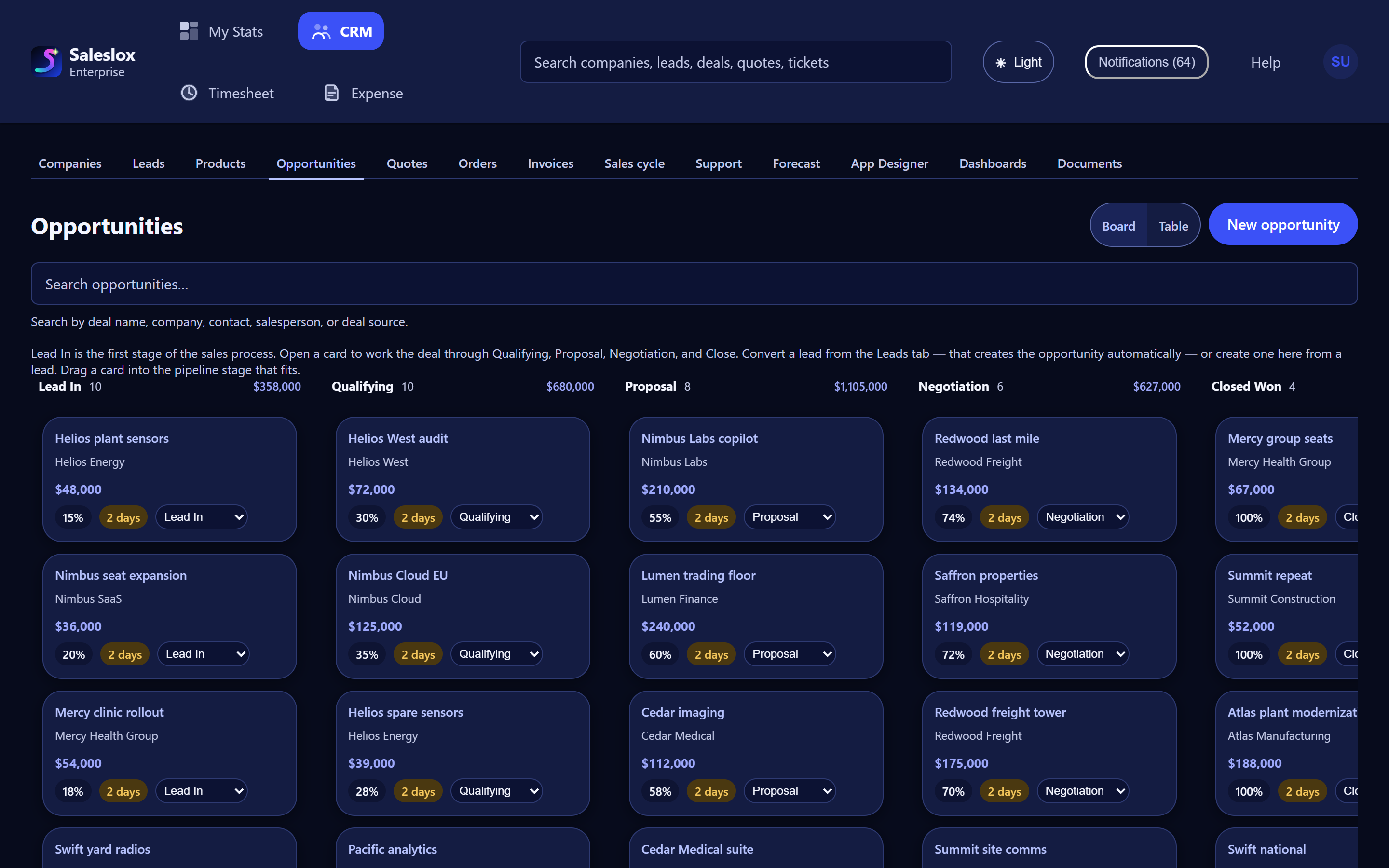
Marcus’s first question is “what does Leah have open?”. In Saleslox that is a search, not an archaeology project. The Leads board can be searched by company, contact name, email, phone, source, notes or salesperson, and shows each lead’s status column and hot, warm or cold tag. The opportunity board can be searched by deal name, company, contact, salesperson or deal source. Together they give the full list of open leads and deals for the handover.

Step 3: read each deal’s state from the board
For every open opportunity the board shows the stage, value, probability and how long the deal has been in its stage. A deal that has sat in Proposal for weeks is the first call the new owner should make. On Professional and Enterprise, opportunity aging and stalled-deal alerts make those quiet deals easy to spot, which matters most in the weeks after a handover.
Step 4: commitments are tasks and quotes, not memories
The revised quote that went missing at Fenwick is exactly what shared records prevent. On Professional and Enterprise, quotes live on the record with a status, from draft and sent to accepted or expired, so the new owner can see what went out and what is pending. A sales cycle on the company holds dated stages and tasks in to-do, doing and done, so “send revised pricing” is a task with a date rather than a sentence in a handover note.
Handover by document vs handover on shared records
| Handover need | Personal tools | Saleslox |
|---|---|---|
| List of open work | Whatever the rep wrote down | Search leads and opportunities by salesperson |
| Customer history | Private mailbox and folders | Contacts, activities and leads tabs on the company |
| Deal status | Personal sheet with its own stages | Shared board with stage, value, probability and age |
| Quotes in flight | Attachments in sent items | Quotes on the record with status and expiry |
| Promises and next steps | In the rep’s head | Sales-cycle tasks with dates |
| Quiet deals after the handover | Discovered when the customer complains | Aging and stalled-deal alerts on Professional and Enterprise |
What changes for a team like Fenwick
In the illustrative scenario, Leah’s two weeks become a walk-through rather than a writing exercise. She and Marcus open her accounts together, check each deal’s stage and log anything not yet on the record. The new owner starts with the company pages, not a forwarded inbox. And the customer who was promised a revised quote sees it arrive, because the promise was a task with a date.
A handover checklist you can use this week
- Search the Leads board and the opportunity board for the departing rep’s name.
- Open each company and check that contacts and recent activities are on the record.
- Review every open quote and its expiry date.
- Sort open deals by time in stage and call the oldest first.
- Introduce the new owner to each customer with a short, specific message about what happens next.
The best time to run this checklist is before anyone resigns. The trial is 30 days of Professional, with no card. For setting up the shared board in the first place, see your first week in Saleslox, and for growing teams, CRM for growing sales teams.
Frequently asked questions
What should a sales rep handover include?
A complete handover covers open leads and deals with their stage and value, the contacts and recent activity for each account, quotes in flight with expiry dates, and any promised next steps with dates.
How do I find every lead and deal a rep owns in Saleslox?
Search the Leads board and the opportunity board by salesperson. Both boards also offer a table view.
Does customer history stay when a rep leaves?
Yes, when it is logged on the company record. Contacts, activities and leads sit on tabs on the company, so they do not depend on one person’s mailbox.
Which plans include stalled-deal alerts and sales-cycle tasks?
Opportunity aging and stalled-deal alerts, quotes and orders, and sales-cycle workflows are on Professional and Enterprise. The 30-day trial is Professional, with no card required.
Is Fenwick Packaging a real Saleslox customer?
No. Fenwick Packaging and every person and number in its story are invented to illustrate a common pattern. No customer results are claimed.
Sources
- Bertuzzi, M. (2025). SDR Models, Motions & Metrics: 2025 Research Report (10th ed.). The Bridge Group. Survey of 351 B2B companies. bridgegroupinc.com
- Salesforce (2026). State of Sales, 7th edition. Survey of 4,050 sales professionals in 22 countries, August–September 2025. salesforce.com